One of the highlights for the year for BTAF token, let’s stake a sneak peak at the staking dashboard 😉
After many weeks of hard work by our staking master chefs, we’re proud to finally reveal to you all what you can expect from the staking platform dashboard!
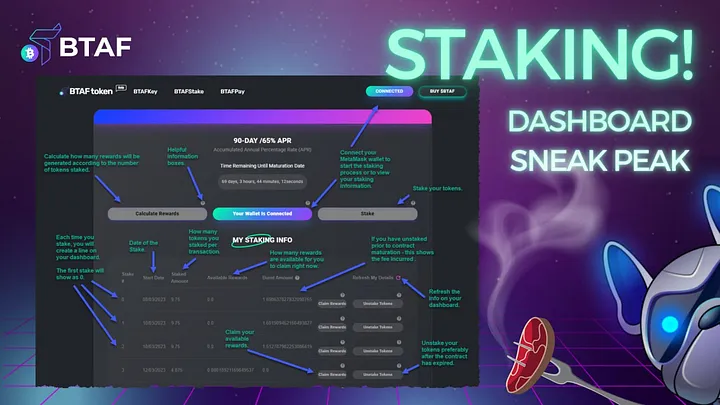
Once we launch our 90-day / 65% APR staking contract live on btaftoken.io (we’ll be announcing it officially sometime from 05:30am UTC 👀) you will see the same layout as in the image above.
The staking dashboard consists of three main buttons: “Calculate Rewards”, “Connect Wallet” & “Stake”.
You will notice that are❔next to all of the buttons that will give you more info in a pop-up on each button when you click/tap on them.
The “Calculate Rewards” button will open up a page where you can input the number of tokens you’d like to stake and it will calculate how many rewards you will earn over the staking period still remaining in the contract, as well as the 2.5% staking fee that will apply.
Tip: The sooner you stake your tokens the more tokens will be generated on your behalf!
The “Connect Wallet” button will link your MetaMask wallet via your MetaMask browser extension if you’re using a desktop version. If you’re using your mobile phone, you need to use your MetaMask app browser so that it will connect your wallet directly. More info on this in previous FAQs, but will be covered in the AMA coming up in a few hours!
Note: There is a button above with the same function.
Then when your wallet is connected to the staking contract dashboard, you will then be able to hit the “Stake” button. This will pop open a new menu where you’ll be able to enter the amount of tokens you’d like to stake, and submit it to the contract. This will pop open your MetaMask to confirm this, and show you the amount of BNB that will be used for gas fees.
Reminder: There is a 2.5% fee staking fee every time you stake any amount of tokens.
Once you’ve confirmed that you’d like the transaction to take place, you will see the ‘busy’ icon on the page. Do not refresh or leave the page. It should only take a few seconds to then produce the first staking line that you have created. Woohoo!
In that line you will see the number (it may well start with “0”), the start date of that staking action and the amount that you have staked. The rewards are generated every second so if you were to hit the “Refresh My Details” button on the top right of that table, you will see your “Available Rewards” change!
You can “Claim Rewards” at any point, without penalty or fee. This will reset your Available Rewards back to 0. These rewards will be placed into your BTAF token wallet in MetaMask where you can either leave (to accumulate) or stake them in a new line (reminder about the 2.5% fee).
Then the last button is “Unstake Rewards”, which will remove the original staked amount of tokens you placed in that line, and return them to your wallet.
Note: There is a penalty for unstaking your tokens ahead of the 90-day contract maturation date. But, more on this in the upcoming AMA (there will be a recording as well).
Are you ready and excited? We are! 😁